论如何在校园里快速的找到空教室~
引言:
在这个信息爆炸的时代,科技的进步不断为我们的日常生活带来便利。
作为一位热衷于将科技融入生活的大学生,我一直致力于解决校园生活中的小烦恼。最近,我发现了一个困扰许多同学的问题;在课余时间想要找到一间安静的空教室自习或学习,往往需要花费不少时间和精力去寻找。这个问题不仅浪费了宝贵的学习时间,也降低了学习效率。为了改变这一现状,我结合自己的专业知识,开发了此网站,旨在通过技术手段帮助同学们快速找到可用的空教室。
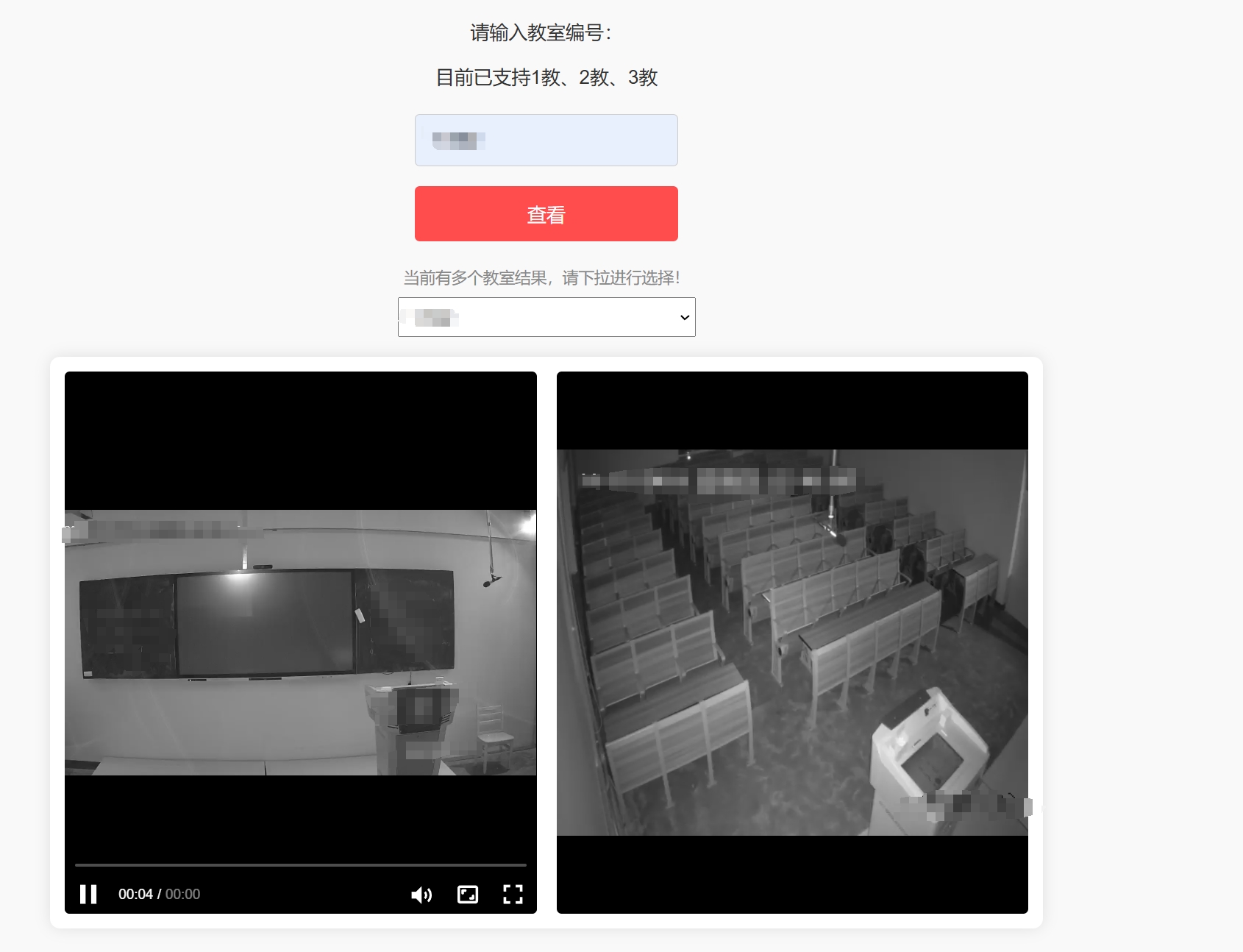
此网站的核心功能是实时监测并显示校园内各教室的使用状态。它的工作原理是通过合法途径调用学校已有的监控系统数据,并将结果以直观的地图形式呈现给用户。用户只需打开网站,选择自己所在的校区,即可一目了然地看到哪些教室目前处于空闲状态。
效果展示图如下
代码部分如下
styles.css
* {
  box-sizing: border-box;
  font-family: 'Arial', sans-serif;
}
html, body {
  width: 100%;
  height: 100%;
  margin: 0;
  padding: 0;
  background-color: #f9f9f9;
  color: #333;
}
.container {
  width: 100%;
  min-height: 100%;
  padding: 20px;
  display: flex;
  flex-direction: column;
  align-items: center;
}
.search-form {
  display: flex;
  flex-direction: column;
  align-items: center;
  margin-bottom: 20px;
}
.search-form label {
  margin-bottom: 10px;
  font-size: 1.2em;
}
.search-form input, .search-form select, .search-form button {
  margin: 5px 0;
  padding: 15px;
  width: 100%;
  max-width: 300px;
  border: 1px solid #ccc;
  border-radius: 5px;
  font-size: 1.2em; /* 增加字体大小 */
}
.search-form button {
  background-color: #ff4c4c;
  color: white;
  border: none;
  cursor: pointer;
  transition: background-color 0.3s ease;
}
.search-form button:hover {
  background-color: #e03a3a;
}
.video-grid {
  display: grid;
  grid-template-columns: repeat(auto-fit, minmax(300px, 1fr));
  gap: 15px;
  width: 100%;
  max-width: 1000px;
  background-color: #fff;
  box-shadow: 0 0 15px rgba(0, 0, 0, 0.1);
  border-radius: 10px;
  padding: 15px;
  box-sizing: border-box;
}
.video-container {
  position: relative;
  overflow: hidden;
  border-radius: 5px;
  background-color: #000;
}
.video-container::before {
  content: "";
  display: block;
  padding-top: 56.25%; /* 16:9 aspect ratio */
}
.video-container > div {
  position: absolute;
  top: 0;
  left: 0;
  width: 100%;
  height: 100%;
}
/* 调整 select 元素的样式 */
.search-form select {
  appearance: none;
  -webkit-appearance: none;
  -moz-appearance: none;
  background-image: url('data:image/svg+xml;utf8,<svg xmlns="http://www.w3.org/2000/svg" viewBox="0 0 24 24" fill="%23333"><path d="M7 10l5 5 5-5z"/></svg>');
  background-repeat: no-repeat;
  background-position: right 15px center;
  background-size: 20px;
  padding-right: 40px; /* 为下拉箭头留出空间 */
  height: 50px; /* 增加高度 */
  line-height: 50px; /* 对齐文本 */
}
.search-form select option {
  font-size: 1.2em; /* 增加选项的字体大小 */
  padding: 10px; /* 增加选项的内边距 */
}
@media (max-width: 768px) {
  .search-form input, .search-form select, .search-form button {
    width: 100%;
    max-width: 100%;
  }
  .video-grid {
    grid-template-columns: 1fr;
    gap: 10px;
    padding: 10px;
  }
}
页面提示部分
terms.html
<!DOCTYPE html>
<html>
<head>
  <meta charset="UTF-8">
  <meta name="viewport" content="width=device-width, initial-scale=1.0">
  <title>用户告知书</title>
  <style>
    body {
      font-family: Arial, sans-serif;
      margin: 0;
      padding: 0;
      display: flex;
      justify-content: center;
      align-items: center;
      height: 100vh;
      background-color: #f0f0f0;
      color: #333;
    }
    .modal {
      background-color: white;
      padding: 20px;
      border-radius: 10px;
      box-shadow: 0 0 10px rgba(0, 0, 0, 0.1);
      max-width: 800px;
      width: 90%;
      position: relative;
      overflow-y: auto;
      max-height: 90vh;
    }
    .modal h1 {
      margin-bottom: 20px;
      font-size: 24px;
      color: #007bff;
    }
    .modal h2 {
      margin-top: 20px;
      margin-bottom: 10px;
      font-size: 20px;
      color: #007bff;
    }
    .modal p {
      margin-bottom: 10px;
      line-height: 1.6;
      font-size: 16px;
    }
    .modal button {
      background-color: #007bff;
      color: white;
      border: none;
      padding: 10px 20px;
      border-radius: 5px;
      cursor: pointer;
      float: right;
      font-size: 16px;
      transition: background-color 0.3s;
    }
    .modal button:hover {
      background-color: #0056b3;
    }
    .timer {
      text-align: left;
      margin-top: 10px;
      font-size: 18px;
      color: red;
    }
    @media (max-width: 600px) {
      .modal {
        padding: 15px;
      }
      .modal h1 {
        font-size: 20px;
      }
      .modal h2 {
        font-size: 18px;
      }
      .modal p {
        font-size: 14px;
      }
      .modal button {
        padding: 8px 15px;
        font-size: 14px;
      }
      .timer {
        font-size: 16px;
      }
    }
  </style>
</head>
<body>
  <div>
    <h1>尊敬的用户</h1>
    <p>1. 本网站旨在为广大学习爱好者提供一个便捷的平台,用于寻找空教室进行自习和学习。为了确保所有用户能够安全、合规地使用这一服务,我们特此声明如下:</p>
    <h2>一、服务条款</h2>
    <p>1. 本网站致力于为用户提供准确、及时、有效的空教室信息,以满足用户的学习需求。我们承诺将持续优化服务,提升用户体验。</p>
    <h2>二、合规使用</h2>
    <p>1. 用户在使用本网站时,应遵守所有适用的法律法规和学校的规章制度,不得进行任何违法、违规或破坏学校秩序的活动。</p>
    <p>2. 用户应尊重并保护教室内的设施和设备,使用完毕后恢复教室的整洁和原状。</p>
    <h2>三、纠纷处理</h2>
    <p>1. 如用户在使用本网站过程中遇到任何问题或纠纷,应及时与我们联系,我们将尽力提供协助和解决方案。</p>
    <p>2. 在处理纠纷时,本网站享有最终解释权。我们将根据相关法律法规和网站规定,公平、公正地处理用户之间的争议和纠纷。</p>
    <h2>四、隐私保护</h2>
    <p>1. 本网站将严格遵守相关法律法规,保护用户的个人隐私和信息安全。</p>
    <h2>五、其他条款</h2>
    <p>1. 本网站保留对服务条款进行修改和完善的权利,修改后的条款将及时在网站上公布。</p>
    <p>2. 用户在使用本网站时,应仔细阅读并理解服务条款,如有异议,请立即停止使用。</p>
    <p>3. 感谢您对本网站的理解和支持!我们将不断努力,为您提供更加优质、便捷的服务。</p>
    <h2>六、联系方式</h2>
    <p>1. 邮箱: 74567@88.com</p>
    <div id="timer">10秒后可关闭</div>
    <button id="agree-btn" disabled>我已阅读并同意上述条款</button>
  </div>

  <script>
    const timer = document.getElementById('timer');
    const agreeBtn = document.getElementById('agree-btn');

    let countdown = 8;
    const interval = setInterval(() => {
      countdown--;
      if (countdown > 0) {
        timer.textContent = `${countdown}秒后可关闭`;
      } else {
        clearInterval(interval);
        timer.style.display = 'none'; // 倒计时结束后隐藏倒计时文本
        agreeBtn.disabled = false;
      }
    }, 1000);

    agreeBtn.addEventListener('click', () => {
      localStorage.setItem('termsAgreed', Date.now());
      window.location.href = 'room.php';
    });
  </script>
</body>
</html>
主代码
index.php
<!DOCTYPE html>
<html>
  <head>
    <meta charset="utf-8">
    <meta name=viewport content="width=device-width,initial-scale=1,maximum-scale=1,minimum-scale=1,user-scalable=no,minimal-ui">
    <meta name="referrer" content="no-referrer">
    <title>xgplayer</title>
    <link rel="stylesheet" href="styles.css">
    <style>
      .container {
        display: flex;
        flex-direction: column;
        align-items: center;
        margin-top: 20px;
      }
      .search-form {
        display: flex;
        gap: 10px;
        margin-bottom: 20px;
      }
      #result-select {
        width: 300px;
        height: 40px;
        font-size: 16px;
        padding: 10px;
        margin-bottom: 20px;
      }
      .video-grid {
        display: flex;
        gap: 20px;
        width: 100%;
      }
      .video-container {
        width: 480px;
        height: 270px;
      }
      .hint {
        color: #888;
        margin-bottom: 10px;
      }

      @media (max-width: 768px) {
        .video-grid {
          flex-direction: column;
        }
        .video-container {
          width: 100%;
          height: auto;
          aspect-ratio: 16 / 9;
        }
      }
    </style>
  </head>
  <body>
      <div class="container">
      <form class="search-form">
        <label for="classroom-input">请输入教室编号:</label>
        <input type="text" id="classroom-input" placeholder="例如:1-502(代表1教502)">
        <button type="button" id="search-button">搜索</button>
      </form>
      <div id="hint" class="hint" style="display: none;">当前有多个教室结果,请下拉进行选择。</div>
      <select id="result-select" disabled>
        <option value="" disabled selected>请先搜索在下拉选择</option>
      </select>
      <div class="video-grid">
        <div class="video-container" id="mse1"></div>
        <div class="video-container" id="mse2"></div>
      </div>
    </div>

    <link rel="stylesheet" href="https://unpkg.byted-static.com/xgplayer/3.0.10/dist/index.min.css"/>
    <script charset="utf-8" src="https://unpkg.byted-static.com/xgplayer/3.0.10/dist/index.min.js"></script>
    <script charset="utf-8" src="https://unpkg.byted-static.com/xgplayer-flv/3.0.10/dist/index.min.js"></script>

    <script>

      const lastAgreedTime = localStorage.getItem('termsAgreed');
      const currentTime = Date.now();
      const oneHour = 1000 * 30 * 30;

      if (!lastAgreedTime || (currentTime - lastAgreedTime > oneHour)) {
        window.location.href = 'terms.html';
      } else {

        let player1Instance = null;
        let player2Instance = null;

        const urls = [保护隐私,不予提供~];

function createPlayer(id, url) {
  if (player1Instance && id === 'mse1') {
    player1Instance.destroy();
  }
  if (player2Instance && id === 'mse2') {
    player2Instance.destroy();
  }

  const classroomPattern = /\/(1-\d{3}|3-\d{3})$/;
  const processedUrl = classroomPattern.test(url) ? url.replace(classroomPattern, '') : url;

  const config = {
    "id": id,
    "url": processedUrl,
    "playsinline": true,
    "poster": "https://xxxx.xxxx.xxxx/images/logo.png",
    "plugins": [FlvPlayer],
    "isLive": false,
    "autoplay": true,
    "fluid": true,
    "playbackRate": [1],
    "closeVideoClick": false,
    "x5-video-player-type": "h5",
    "x5-video-player-fullscreen": "true",
    "x5-video-player-orientation": "landscape"
  };
  const player = new Player(config);
  if (id === 'mse1') {
    player1Instance = player;
  } else if (id === 'mse2') {
    player2Instance = player;
  }
}
        document.getElementById('search-button').addEventListener('click', () => {
          const classroom = document.getElementById('classroom-input').value.trim();
          const resultSelect = document.getElementById('result-select');
          const hint = document.getElementById('hint');
          resultSelect.innerHTML = ''; // 清空下拉选项
          resultSelect.disabled = false; // 启用下拉框

          const isClassroom2Series = classroom.startsWith('2-');
          const matchPattern = isClassroom2Series
            ? new RegExp(`/2_${classroom.slice(2)}(_\\d{3})?\\.flv$`)
            : new RegExp(`/(${classroom})(-\\d+)?`);

          urls.forEach(pair => {
            const [url1, url2] = pair;
            const match = url1.match(matchPattern);
            if (match) {
              const option = document.createElement('option');
              option.value = JSON.stringify([url1, url2]);
              option.text = isClassroom2Series ? classroom : url1.split('/').pop(); // 根据是否是2-开头来决定显示的文本
              resultSelect.appendChild(option);
            }
          });

          if (resultSelect.childElementCount === 0) {
            resultSelect.innerHTML = '<option value="" disabled selected>未找到匹配项</option>';
            resultSelect.disabled = true; // 如果没有匹配项,禁用下拉框
            hint.style.display = 'none';
          } else if (resultSelect.childElementCount === 1) {
            // 如果只有一个选项,直接播放
            const selectedOption = resultSelect.firstElementChild;
            const [url1, url2] = JSON.parse(selectedOption.value);
            createPlayer("mse1", url1);
            if (url2) {
              createPlayer("mse2", url2);
            }
            hint.style.display = 'none';
          } else {
            hint.style.display = 'block'; // 显示提示信息
            resultSelect.selectedIndex = 0; // 默认选择第一个选项
            resultSelect.dispatchEvent(new Event('change')); // 触发 change 事件
          }
        });

        document.getElementById('result-select').addEventListener('change', () => {
          const selectedOption = document.getElementById('result-select').selectedOptions[0];
          if (selectedOption) {
            const [url1, url2] = JSON.parse(selectedOption.value);
            createPlayer("mse1", url1);
            if (url2) {
              createPlayer("mse2", url2);
            }
          }
        });
      }
    </script>
  </body>
</html>